Wildberries Courier
Wildberries is one of the largest marketplaces in Russia. At the beginning of the pandemic, the number of users and orders has increased significantly. Couriers couldn't cope with the amount of orders. Such problems arose throughout the marketplace network, throughout the country. The company has begun upgrading the internal logistics service process.
I was offered an opportunity to design an application for couriers. At that time, there was already an existing courier application that couriers used. But it needed improvement.
In order to understand what changes were needed in the operation of the application, I went to warehouses and studied how couriers work, e.g. how they received and returned orders. I traveled with couriers on deliveries and studied the entire workflow.
Project tasks:
1. Simplify the stage of receiving items for delivery
2. Simplify work during delivery
3. Simplify the process of returning items
4. Build a logical visual hierarchy and connectivity of information blocks
1. Simplify receiving goods for delivery
Existing process
Couriers were looking for goods to be delivered using a printed piece of paper. On the sheet opposite each product was written the number of the rack cell, which contained the necessary goods for this courier. Courier checked the number of the cell on the sheet with the barcodes of the packages in the cells and collected the items for delivery.
Problem
Couriers mixed up packages with goods and could take wrong packages (it is difficult to check the barcode and number visually). Because of this, there were shortages for other couriers, the warehouse manager had to investigate, call all couriers, resolve the conflict, the courier responsible for the mistake.
Task
Reduce the number of errors at the stage of receiving goods by couriers.
Solution
We added a barcode scanner and automatic verification of barcodes in the application. The cell is indicated to the courier in the application. The courier scans the barcode on the package of goods in this cell. If the courier took the correct package, the application confirms this and shows the number of the cell with the next package.
Outcome
• reduced the number of errors
• reduced the load on the memory of the courier
• reduced the load on the warehouse manager
• reduced time costs by reducing errors
• reduced the amount of paper used in the process
Barcode scanner
2. Simplify the delivery process
Existing process
The courier calls customers assigned to them (customers do not have an exact delivery time) and clarifies whether it will be convenient to take the order within an hour. The courier collects up to 5-7 customers who are ready for delivery within an hour.
By default, orders in the application are sorted by the proximity of the delivery address to the warehouse.
If the client cannot accept the order today, the courier puts the status “Change date” on the order.
Problem
The courier searched for customers again and again in the list sorted in an order that didn't correspond to the order of delivery. During work, the courier was driving, he needed to receive calls from customers and the manager, so it was important to simplify access to the orders that he was currently working with and reduce the load on the courier's memory.
Task
Speed up the search for orders that the courier has chosen to work, thereby reducing the load on the courier's memory and reducing stress factors.
Solution
Outcome
• reduced the load on the memory of the courier (no need to remember the order, you can see it)
• reduced the number of errors
• reduced labor effort - no need to scroll through orders in search of the next
Changing the order in the list
Changes to the order on the map
3. Simplify the return of goods
Existing process
The courier comes to the client, gives all the goods. The client can try on and refuse some of the goods. He gives the goods back to the courier. The courier collects goods from different customers that need to be returned to the warehouse on that day.
Problem
When the courier came to the warehouse to return the goods, it turned out that he could have forgotten some goods at the client's. Not all couriers were responsible to check the goods while at the client.
Task
Make it possible to see all the goods that the courier needs to return to the warehouse in one place
Solution
I designed a list of items to be returned to the warehouse
Outcome
Reduced the ammount of critical errors
All returns screen
4. Build a visual hierarchy and communication of information blocks
Below I analyze what I have changed, using the example of two frequently used screens.
Before
After
На возврат 3 пакета и 5 товаров

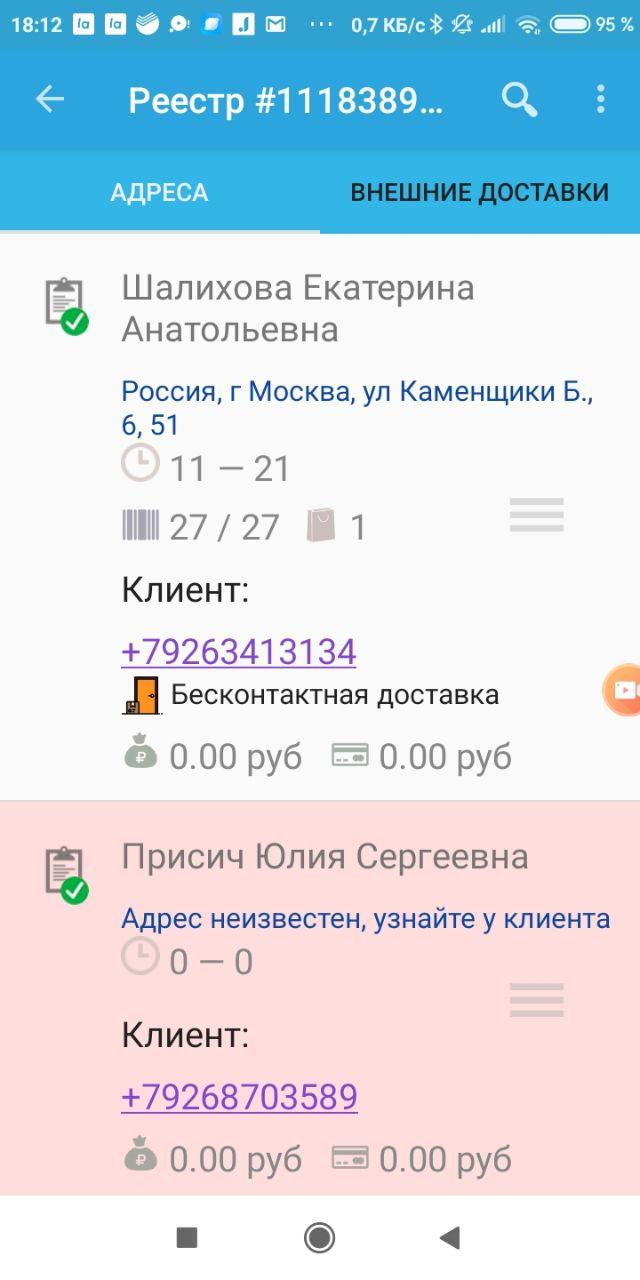
A bulky, chaotically arranged order card. Fonts of chaotic sizes and saturation. This prevents the user from perceiving the information on the screen.
The card has become more compact. It is immediately clear who we will call and where to go. And all other blocks appear as needed. They can be seen on the second card.
The user will not immediately guess that the document icon with a check mark indicates the status of the order. There are quite a lot of such statuses. Using icons in this case turns viewing the list of orders into solving a puzzle. Not suitable for new couriers.
Statuses have been replaced with simpler and more obvious ones. You can see the list of statuses in more detail in the video about displaying the list of goods for return.
Frequently used functions are hidden: call the client and build a route to the client's address. These functions can be seen by sliding the order card sideways. Not suitable for new couriers.
Important functions — calling and routing — are made available for quick access. There is no need to explain anything.
There were cases when couriers wrote personal messages to the store's customers using the number from the application.
We decided not to show the phone number, but only showed the call icon. The call was made through the Wildberries call center.
Before
After



Size:
Color:
Price:
Size:
Color:
Price:

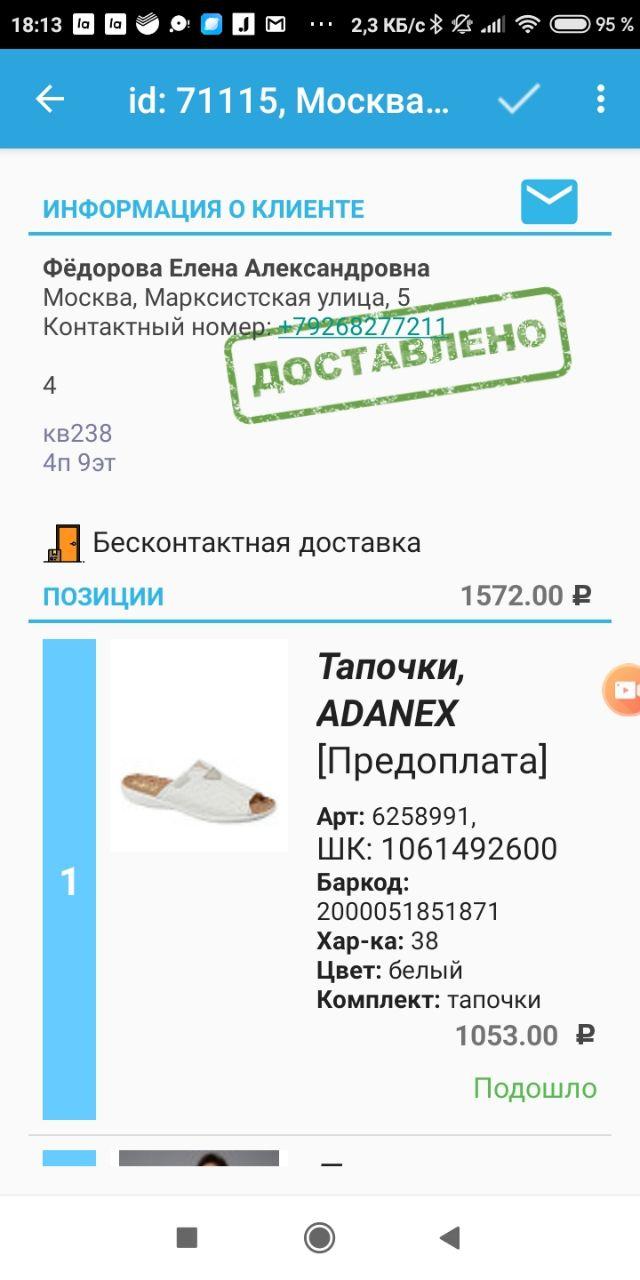
The name of the item is displayed in a huge font and uses only half the width of the screen. And the name of the customer is less saturated than the names of the characteristics of the product: "Barcode", "Color".
I made the grouping of product card elements more logical. The product photo is the largest element of the card. The product name is smaller, the serial number is not needed. I added the division of goods into packages — there could be several packages and they are also numbered. The predictable mechanics of changing the status of the product is implemented using a drop-down list.
It is not clear what the checkmark in the upper bar means. I thought it was an order completion icon, but the order has already been completed. Perhaps this is the status of the order, although the tick looks clickable. What happens when you click on the tick? Will the completed order be canceled? All this is not obvious to a new user.
In the new application, we have removed the ability to reset the order status for delivered orders. The scenario when the courier has to cancel the order status is extremely rare. An opportunity to reset the order status gives courier ability to steal refused items by marking them as delivered.
It is difficult to guess whether there is an opportunity to call the client from this screen, as well as to build a route — and these are frequently used functions.
Important functions — call and routing — are made available for quick access in the same place of the order card, it is noticeable and easy to get used to.
The door icon indicates contactless delivery. The location of this icon is a vivid example of a violation of the principle "internal margins are less than or equal to external". This icon is closer to the product information than to the general order information.
All screen content is grouped according to the specified proximity principle. At that time all orders were delivered contactless, so there is no need for spicial icon for that on the new screen.
The order status is shown by a print image on top of the order information. Ingenious, but it looks rough and at the same time interferes with reading of the information.
I decided to show the statuses as text in a colored rectangle with rounded corners. It is clear, noticeable, does not take up much space.
If you are interested in incomprehensible numbers in the order information block, then they are the courier's comment. To edit a comment, you need to click the letter icon above the name. I wouldn't have guessed.
The project manager and I wanted to make it possible to leave a comment, but we decided not to include the addition of this function in the first iteration.
Outcome
• Lowered the threshold for entry into the workflow for new couriers.
• Lowered the number of repetitive actions and time costs.